 AntShot
Full page screenshots for Chrome and Edge. Capture an entire page, the visible area or a selection, annotate it, and save it as an image or PDF.
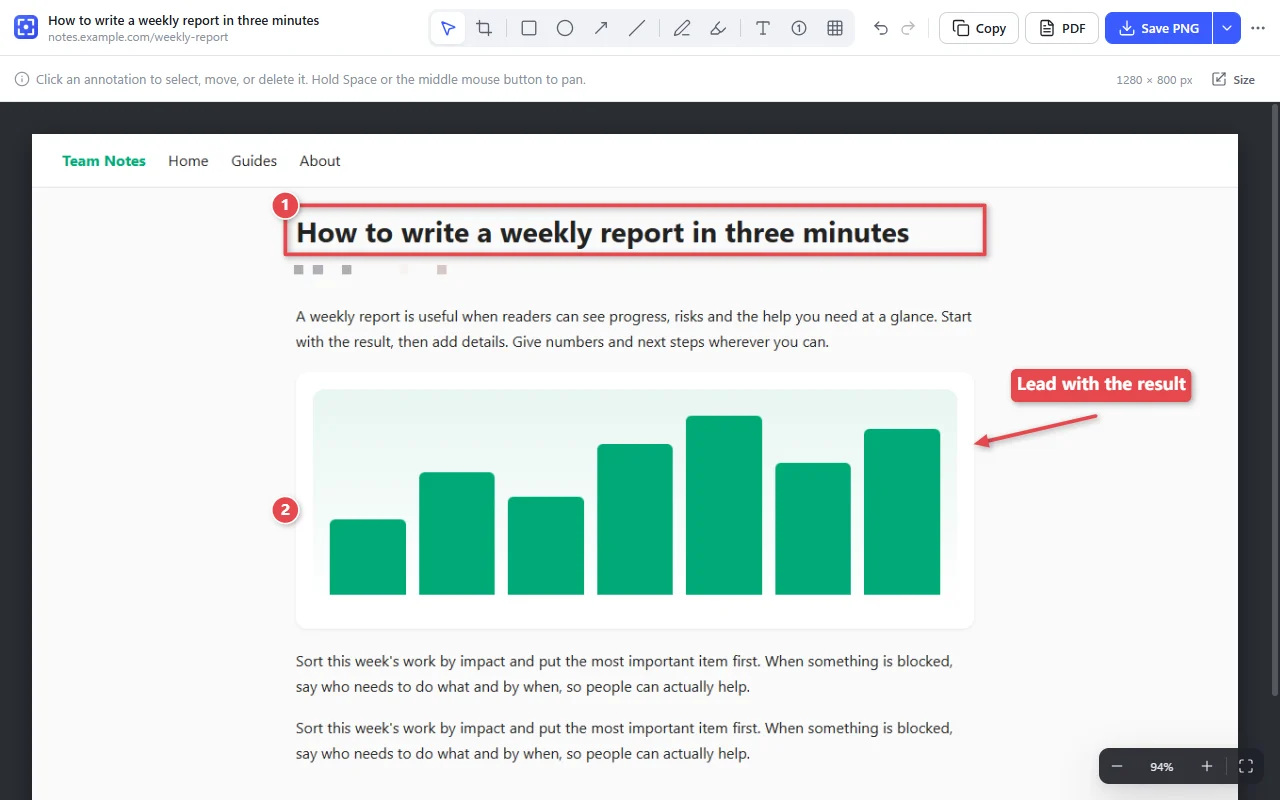
What it does
- Capture the entire page (AntShot scrolls for you), the visible area, or an area you drag, even if it's longer than the screen.
- Annotate with boxes, arrows, lines, pen, highlighter, text and numbered steps. Crop and resize.
- Save as PNG, JPG or PDF, copy to the clipboard, or print.
- History keeps your recent captures so you can edit or export them later.
- Private: screenshots stay in your browser on your device. No account, no analytics, no ads.
Pricing
AntShot is free to use. Pro adds the features listed below. You can try every Pro feature free for 7 days in the extension, without entering payment details.
Free
$0
- Entire page, visible area and selection capture
- Crop, resize, and annotate with boxes, arrows, text, numbers and more
- Save as PNG, JPG or a single-page PDF
- Copy to the clipboard and print
- Capture history
Pro Yearly
$19per year
Everything in Free, plus:
- Pixelate and blur, to hide sensitive information
- Paged PDFs (A4 or Letter) with clickable links
- Headers, footers and watermarks on images and PDFs
- Capture all tabs in a window, your desktop or another app's window
- Save as GIF, BMP or WebP
- Style presets
- Batch save, merge into one PDF and print from History
- One license key for up to 3 devices
Renews every year until you cancel. Cancel anytime.
Pro Lifetime
$39one-time payment
Everything in Free, plus:
- Pixelate and blur, to hide sensitive information
- Paged PDFs (A4 or Letter) with clickable links
- Headers, footers and watermarks on images and PDFs
- Capture all tabs in a window, your desktop or another app's window
- Save as GIF, BMP or WebP
- Style presets
- Batch save, merge into one PDF and print from History
- One license key for up to 3 devices
Pay once. No renewals. Includes all future updates.
- Prices are in US dollars and include any taxes that apply, such as VAT or sales tax.
- After you pay, your license key appears on the confirmation page and in your receipt email. In AntShot, open Settings, go to Pro, click "I have a license key" and paste it.
- Not happy with Pro? Email us within 14 days of your purchase for a full refund. See the refund policy.
- Payments are processed by Creem, our merchant of record.
Questions
Does AntShot use AI?
No. AntShot has no AI features. It doesn't generate text, replies, images or video. It captures and annotates what is already on your screen.
Where are my screenshots stored?
In your browser, on your device. AntShot never uploads them. See the privacy policy.
Can I use one license on more than one computer?
Yes, on up to 3 devices at the same time. To move the key to another device, open Settings, go to Pro on the old device and click "Deactivate on this device".
How do I cancel a yearly subscription?
In AntShot, open Settings, go to Pro and click "Manage subscription". You can also sign in to the Creem customer portal with the email address you paid with. Pro stays active until the end of the year you paid for.
Support
Email support@antshot.com. If your question is about a purchase, include your order number or the email address you paid with.